How to create custom tools (Function Tools, MCP Tools, OpenAPI Tools) in Google ADK with code examples?
#google-adk#tools#function-tools#mcp#openapi#custom
Answer
Creating Custom Tools in Google ADK
Google ADK makes it easy to create tools from Python functions, MCP servers, or OpenAPI specifications. Tools are how agents interact with the outside world.
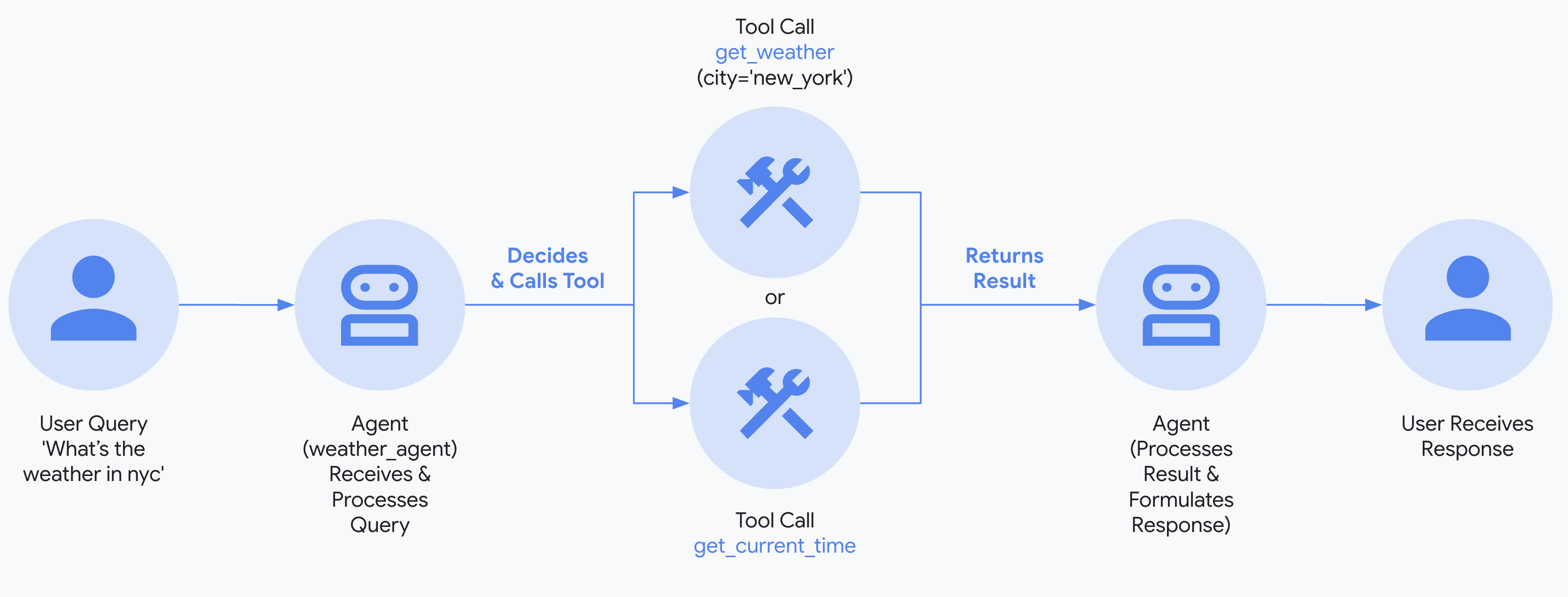
Tool Execution Flow
1. Function Tools (Most Common)
Any Python function with type hints and a docstring becomes a tool:
pythonfrom google.adk.agents import Agent import requests def search_arxiv(query: str, max_results: int = 5) -> list[dict]: """Search arXiv for academic papers. Args: query: Search query for academic papers. max_results: Maximum number of papers to return. Returns: list[dict]: List of papers with title, authors, and summary. """ # API call to arXiv url = f"http://export.arxiv.org/api/query?search_query={query}&max_results={max_results}" response = requests.get(url) # Parse and return results return [{"title": "Paper 1", "authors": ["Author A"], "summary": "..."}] def save_notes(filename: str, content: str) -> str: """Save research notes to a file. Args: filename: Name of the file to save. content: Content to write to the file. Returns: str: Confirmation message. """ with open(f"notes/{filename}", "w") as f: f.write(content) return f"Notes saved to {filename}" # Agent automatically discovers tool signatures agent = Agent( name="researcher", model="gemini-2.5-flash", instruction="Help users find and organize research papers.", tools=[search_arxiv, save_notes], )
Tool with Context Access
pythondef get_user_history(tool_context) -> list[str]: """Get the current user's query history.""" history = tool_context.state.get("user:history", []) return history def update_preferences(preference: str, value: str, tool_context) -> str: """Update user preferences. Args: preference: The preference key to update. value: The new value for the preference. """ tool_context.state[f"user:pref_{preference}"] = value return f"Updated {preference} = {value}"
2. MCP Tools
Stdio Connection (Local)
pythonfrom google.adk.tools.mcp_tool import McpToolset, StdioServerParameters # Filesystem MCP server fs_tools = McpToolset( connection_params=StdioServerParameters( command="npx", args=["-y", "@modelcontextprotocol/server-filesystem", "./data"], ) ) # Database MCP server db_tools = McpToolset( connection_params=StdioServerParameters( command="npx", args=["-y", "@modelcontextprotocol/server-postgres"], env={"DATABASE_URL": "postgresql://localhost:5432/mydb"} ) ) agent = Agent( name="data_agent", model="gemini-2.5-flash", instruction="Help users manage files and query databases.", tools=[fs_tools, db_tools], )
SSE Connection (Remote)
pythonfrom google.adk.tools.mcp_tool import McpToolset, SseServerParams remote_tools = McpToolset( connection_params=SseServerParams( url="https://mcp-server.example.com/sse", headers={"Authorization": "Bearer your-token"} ) )
3. OpenAPI Tools
Auto-generate tools from an API specification:
pythonfrom google.adk.tools.openapi_tool import OpenAPIToolset # From YAML file yaml_toolset = OpenAPIToolset( spec_str=open("petstore.yaml").read(), spec_str_type="yaml", ) # From JSON file json_toolset = OpenAPIToolset( spec_str=open("api-spec.json").read(), spec_str_type="json", ) # With authentication auth_toolset = OpenAPIToolset( spec_str=open("api.yaml").read(), spec_str_type="yaml", auth={"api_key": "your-api-key"}, ) agent = Agent( name="api_agent", model="gemini-2.5-flash", instruction="Help users interact with the API.", tools=yaml_toolset.get_tools(), )
4. Agents-as-Tools
pythonfrom google.adk.tools import AgentTool specialist = Agent( name="code_reviewer", model="gemini-2.5-flash", instruction="Review code for bugs, security issues, and best practices.", ) main_agent = Agent( name="dev_assistant", model="gemini-2.5-flash", instruction="Help developers. Use the code reviewer for code analysis.", tools=[AgentTool(agent=specialist)], )
Best Practices
| Practice | Why |
|---|---|
| Always add docstrings | ADK uses them as tool descriptions for the LLM |
| Use type hints | ADK extracts parameter types from hints |
| Keep tools focused | One tool = one action |
| Return structured data | Dicts and lists are better than plain strings |
| Use text | Access state, save artifacts, manage context |
Learn more at Function Tools and MCP Tools.